
Loxo Chrome Extension
Instantly source and engage candidates from anywhere on the web
The Loxo Chrome Extension lets you pull candidate profiles into your Loxo database with a click — complete with contact info, job/campaign tags, activities, and outreach tools — so you stay in flow wherever you find talent.
“One click, and I can pull all of this information into Loxo? It’s a game-changer, especially when we’d previously been copy-and-pasting everything into our old ATS."
— Ashley Watson, Director of People & Ops at AC Lion
How it works
Find candidates that fit the bill — and engage them on the spot
No more task-switching or breaking your flow state. Loxo's Chrome Extension makes it easier than ever to add candidates to your database while you browse, without ever leaving the site you're on.
01
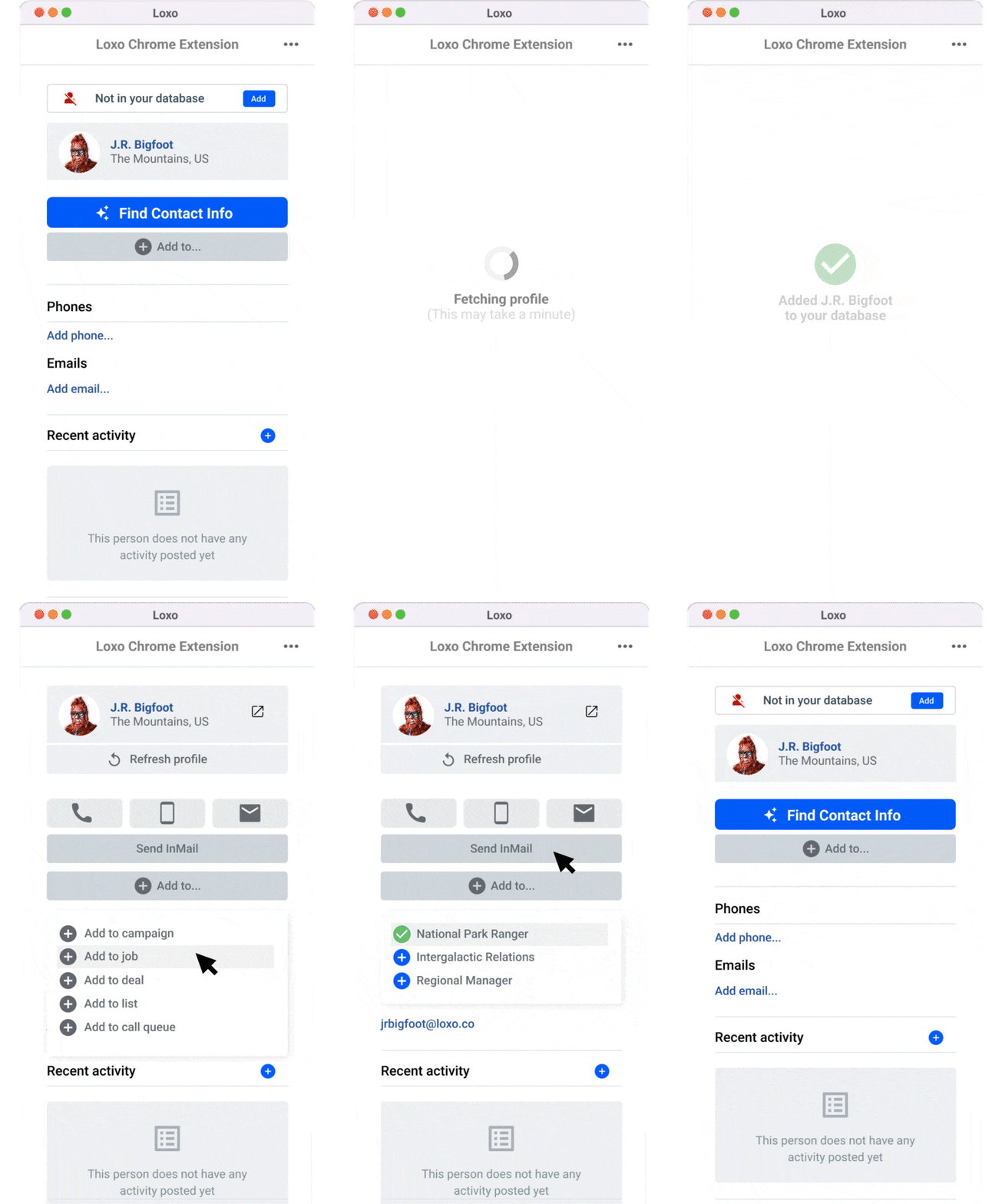
Add the Loxo Chrome Extension to your browser, then pin it to your browser bar for quick access.

02
Stumble upon a great candidate profile online? Click the extension icon to open it up.
03
Click Add to database to import the candidate into Loxo with available contact info & profile details.
04
From the extension, add the person to jobs, campaigns, deals, lists, or call queues — or even send emails or SMS.
05
All activites that happen within the extension are automatically logged in Loxo.


Talent Intelligence Platform
It shouldn't take 10+ tools to make one hire
With the Talent Intelligence Platform, you move through your entire recruitment workflow seamlessly by bringing it all under the same roof.
When you find a qualified candidate, you can instantly access their contact info, drop them into a pipeline, and start an outreach campaign — all in just a few clicks, without ever having to leave Loxo.
Questions about the Loxo Chrome Extension?
You've come to the right place.
It can do both! If a person already exists in your database, the extension offers an option to Refresh their record with updated information.
Once a profile is added or refreshed, you can assign the person to jobs, campaigns, call queues, lists, log activities, or send emails/SMS directly from the extension itself.
Yes! Loxo is fully GDPR and CCPA compliant.
Any page in Chrome where a candidate’s profile exists — GitHub, job boards, portfolio sites, etc. The extension pulls what it can see and adds it to your CRM.
The extension detects duplicates when the social profile includes a matching URL stored in Loxo; it may show the last refresh time and let you choose to refresh the record instead of adding a new one.
Lorem ipsum dolor sit amet, consectetur adipiscing elit, sed do eiusmod tempor incididunt ut labore et dolore magna aliqua. Ut enim ad minim veniam, quis nostrud exercitation ullamco laboris nisi ut aliquip ex ea commodo consequat.
Lorem ipsum dolor sit amet, consectetur adipiscing elit, sed do eiusmod tempor incididunt ut labore et dolore magna aliqua. Ut enim ad minim veniam, quis nostrud exercitation ullamco laboris nisi ut aliquip ex ea commodo consequat.
Lorem ipsum dolor sit amet, consectetur adipiscing elit, sed do eiusmod tempor incididunt ut labore et dolore magna aliqua. Ut enim ad minim veniam, quis nostrud exercitation ullamco laboris nisi ut aliquip ex ea commodo consequat.
Lorem ipsum dolor sit amet, consectetur adipiscing elit, sed do eiusmod tempor incididunt ut labore et dolore magna aliqua. Ut enim ad minim veniam, quis nostrud exercitation ullamco laboris nisi ut aliquip ex ea commodo consequat.
Lorem ipsum dolor sit amet, consectetur adipiscing elit, sed do eiusmod tempor incididunt ut labore et dolore magna aliqua. Ut enim ad minim veniam, quis nostrud exercitation ullamco laboris nisi ut aliquip ex ea commodo consequat.
Ready to shape the future?
Your job is placing the best talent in the roles that will define their careers, their lives, and our future. Our job is making it easier for you to do it.

